 FormatFox
Images
The system image library reads the file from a local path, decodes it, applies any resize, and writes the new file to another local path. The output is reopened and checked before it is shown to you.
A browser converter cannot convert anything until it has your file. That is not a policy choice, it is how the architecture works. An app on the phone does not have that requirement.

Every conversion in FormatFox finishes with the phone in Airplane Mode.
| Step | Browser or cloud converter | FormatFox |
|---|---|---|
| Where the file goes | Onto a machine operated by the service | Nowhere. It stays in the app working area on the phone |
| Who does the decoding | Server software you cannot inspect | The image, PDF and audio frameworks already in iOS |
| Needs a connection | Yes, for upload and download | No. Airplane Mode is a fine place to work |
| What you have to trust | A retention policy and the people behind it | That the phone did what the result screen says |
| Speed depends on | Your upload bandwidth | The phone, which is fast for a single photo |
This is not an accusation against any particular service. It is a description of what a remote converter has to do to work at all, and the reason it is the wrong shape for a passport page or a signed contract.
The system image library reads the file from a local path, decodes it, applies any resize, and writes the new file to another local path. The output is reopened and checked before it is shown to you.
The system PDF renderer draws one page per image and the finished document is opened again so its page count can be compared with the number of images you selected.
The system audio framework reads the source in chunks, encodes each chunk and writes the new container. The result is reopened to confirm it is a valid audio file.
None of those three paths has a network call in it. There is no upload to disable and no setting to get wrong, because the code that would send a file does not exist.
The free tier is paid for by one banner at the bottom of the screen, served by Google AdMob. That banner needs a connection, and on first launch the app asks for advertising consent and for the iOS tracking permission, in that order.
The ad and the converter are separate. The ad code never sees a file you picked, and the conversion path never talks to the ad code. If you would rather have no network traffic at all, the Pro unlock removes the banner, and the app then makes no outbound requests while converting. The exact wording is in the privacy policy.
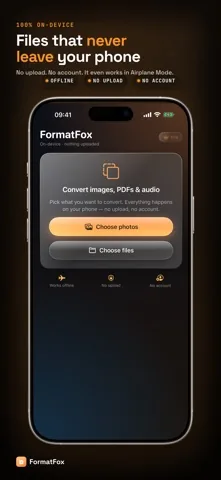
Put the phone in Airplane Mode and convert something. If a converter finishes the job with no network at all, the work happened on the device, because there was nowhere else for it to happen. FormatFox completes every image, PDF and audio conversion in that state.
Yes, for one thing. The free tier shows a single banner ad served by Google AdMob, which is why the app asks for advertising consent on first launch. That connection carries ad requests, never your files, and the Pro unlock removes the banner and with it the only network traffic the app makes.
No. There is no registration, no login and no profile. The Pro unlock is a normal App Store purchase tied to your Apple Account, so nothing about you is stored by the app itself.
They are written into the app working area on your phone and handed to you through the standard iOS share sheet, so you decide whether they end up in Photos, in Files, in a message or nowhere at all.