iPhone, iOS 17 and later

File converter for iPhone: HEIC, JPG, PNG, PDF and audio

FormatFox converts on the phone itself, so the file never leaves it. Free to use, no account, and the Pro unlock is a single payment rather than a subscription.

Download on the App Store

Free on the App Store. Optional one time Pro unlock, 4.99 EUR base price.

  • Works offline
  • No upload
  • No account
  • No subscription

What it looks like

These are the real App Store screenshots. The number under each conversion is the measured file size, not an estimate.

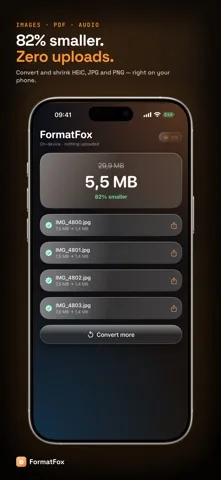
  • FormatFox showing four converted JPG files and a result of 5.5 MB down from 29.9 MB
    Every conversion reports the exact size before and after, per file and in total.
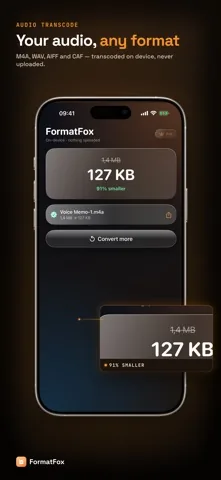
  • FormatFox converting a voice memo to M4A, 127 KB down from 1.4 MB
    Audio goes to M4A, WAV, AIFF or CAF without leaving the phone.
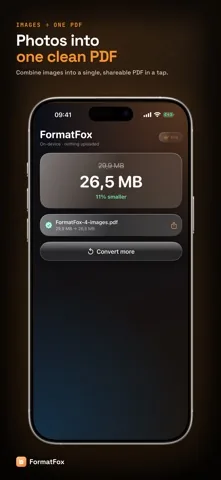
  • FormatFox combining four photos into a single PDF file
    Several photos become one PDF, one page per image.
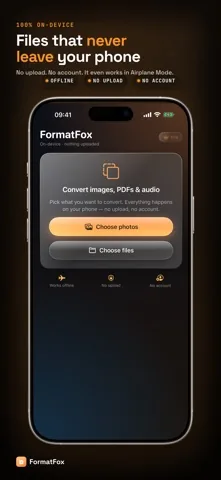
  • The FormatFox start screen with the labels works offline, no upload and no account
    No account, no login, and it still works in Airplane Mode.

Every format pair, written out

No hidden catalogue and no format that turns out to be a paywall in disguise. This is the whole list.

Goes inComes outTier
HEIC JPG PNG WEBPJPG PNG HEIC WEBPFree, one file at a time
Several photos, HEIC JPG PNGOne PDFFree, however many photos you pick
Any of the above, resized by longest sideSame format, fewer pixelsFree
M4A WAV AIFF CAF MP3M4A WAV AIFF CAFPro
Many files in one goSame conversions, run as a batchPro

Two honest footnotes. MP3 can be read but never written, because iOS ships an MP3 decoder and no MP3 encoder. WebP appears as a target only on iPhones whose system image library can write it, so on some devices you will see three image targets instead of four.

What makes it different

Most converters for iPhone are a front end for a server. FormatFox is not, and the rest of the design follows from that one decision.

The file never leaves the phone

Images run through ImageIO, PDFs through PDFKit and audio through AVFoundation, all on local files. There is no upload step to opt out of, because there is no upload step. That is why conversion still works with the network switched off.

The size is a measurement, not a promise

Every result carries the exact input and output byte count, per file and as a total. You can see whether a conversion was worth doing instead of guessing from a progress bar.

Photos into one PDF, without a scanner plan

Pick a handful of photographed pages and get a single PDF, one page per image, each page sized to its own image. The result is opened and page counted before the app calls it a success.

Audio that stays on the device

Voice memos and recordings go to M4A, WAV, AIFF or CAF. Sample rate and channel count are taken from the source, M4A is written as AAC at 128 kbps, and copy protected tracks are refused rather than half converted.

Convert with FormatFox, from any app

The share sheet action takes an image from Photos, Files, Mail or anywhere else, converts it and hands it straight back to the sheet. Free converts the first image you shared, Pro converts all of them.

One payment or none

The free tier is not a trial and is not metered per file. Pro is a non consumable purchase, so it is bought once and restored on a new phone, not billed every month.

Download on the App Store

What people open it for

Four jobs that come up over and over. Each one has its own page with the built in alternatives written out as well.

A form that refuses HEIC

Passport applications, insurance portals and older company systems often accept JPG and nothing else. Converting a photo that shows an identity document is exactly the case where an upload to a stranger’s server is the wrong answer. HEIC to JPG on iPhone

A contract photographed page by page

Six photos of a signed agreement are six attachments. As one PDF they are one document that a lawyer or a landlord can actually file. Photos into one PDF

An attachment that is too big to send

Mail bounces at around 25 MB and plenty of upload forms stop far sooner. Fewer pixels and stronger compression are two different levers, and it helps to know which one you are pulling. Compress photos on iPhone

A recording an editor will not open

A voice memo in the wrong container is a common wall when you hand material to a transcription tool or a video editor. M4A is usually the answer, and WAV when the tool wants uncompressed audio. Audio converter for iPhone

Free tier, and one payment if you outgrow it

The free side is a working converter, not a demo. Pro exists for people who convert in bulk or work with audio.

Free

0No trial period, no file counter
  • HEIC, JPG, PNG and WebP conversion, one file at a time
  • Resize by longest side
  • Combine any number of photos into a single PDF
  • Exact size before and after every conversion
  • Convert with FormatFox share action, first image
  • Supported by one banner ad

FormatFox Pro

4.99 EUROne time unlock, base price. Your App Store shows the local amount.
  • Convert many files in one pass
  • Audio transcoding to M4A, WAV, AIFF and CAF
  • Quality and compression slider
  • Keep EXIF, GPS and TIFF metadata
  • Share action converts every image you shared
  • No ads
Download on the App Store

Pro is a non consumable purchase and can be restored on another device.

Frequently asked questions

Formats, price, privacy and the limits, in plain terms.

Is FormatFox free?

Yes. Converting between HEIC, JPG and PNG, resizing an image and combining photos into a single PDF are free and are not metered. A one time Pro unlock adds batch conversion, audio transcoding, the quality slider and EXIF preservation. The base price of that unlock is 4.99 EUR and the App Store shows it in your local currency. There is no subscription.

Do my files get uploaded anywhere?

No. FormatFox converts with the frameworks already on your iPhone: ImageIO for images, PDFKit for PDF and AVFoundation for audio. There is no networking code anywhere in the conversion path, which is why conversion also works in Airplane Mode. The free tier does show one banner ad, and that ad is the only part of the app that talks to the internet. It never sees your files.

Which formats can FormatFox actually convert?

Images go in as HEIC, JPG, PNG or WebP and come out as JPG, PNG, HEIC or WebP. Photos can be combined into a single PDF. Audio goes in as M4A, WAV, AIFF, CAF or MP3 and comes out as M4A, WAV, AIFF or CAF. MP3 is deliberately input only, because iOS can decode MP3 but cannot encode it.

Does FormatFox need an account?

No. There is no sign up, no login and no profile. You open the app, pick files and convert. The Pro unlock is a normal App Store purchase tied to your Apple Account, so Restore purchase brings it back on a new phone.

Can I convert from the share sheet?

Yes. Convert with FormatFox appears in the iOS share sheet for images and hands the converted JPG straight back to the sheet, so you can send it on without opening the app. Without Pro the share action converts the first shared image; with Pro it converts every image you shared.

What does FormatFox not do?

It does not convert video, Office documents or archives, it does not turn an existing PDF back into images, and it cannot write MP3. It is a focused image, PDF and audio converter for iPhone, not a universal one.

Convert the next file on your phone

Free to install, no account to create, and nothing to upload.

Download on the App Store